

Search rules: you decide how your shop’s search behaves
What happens to out-of-stock items, what customers see when nothing matches, which products appear first — plus rule suggestions based on your own data.
Findora’s automatic ranking takes relevance, availability and sales into account. But some decisions are yours to make: what you show when something is out of stock, which product you want up front during a campaign, where customers go when they type “black friday”. On the Search rules page of the portal you set all of this yourself, with no technical knowledge required.
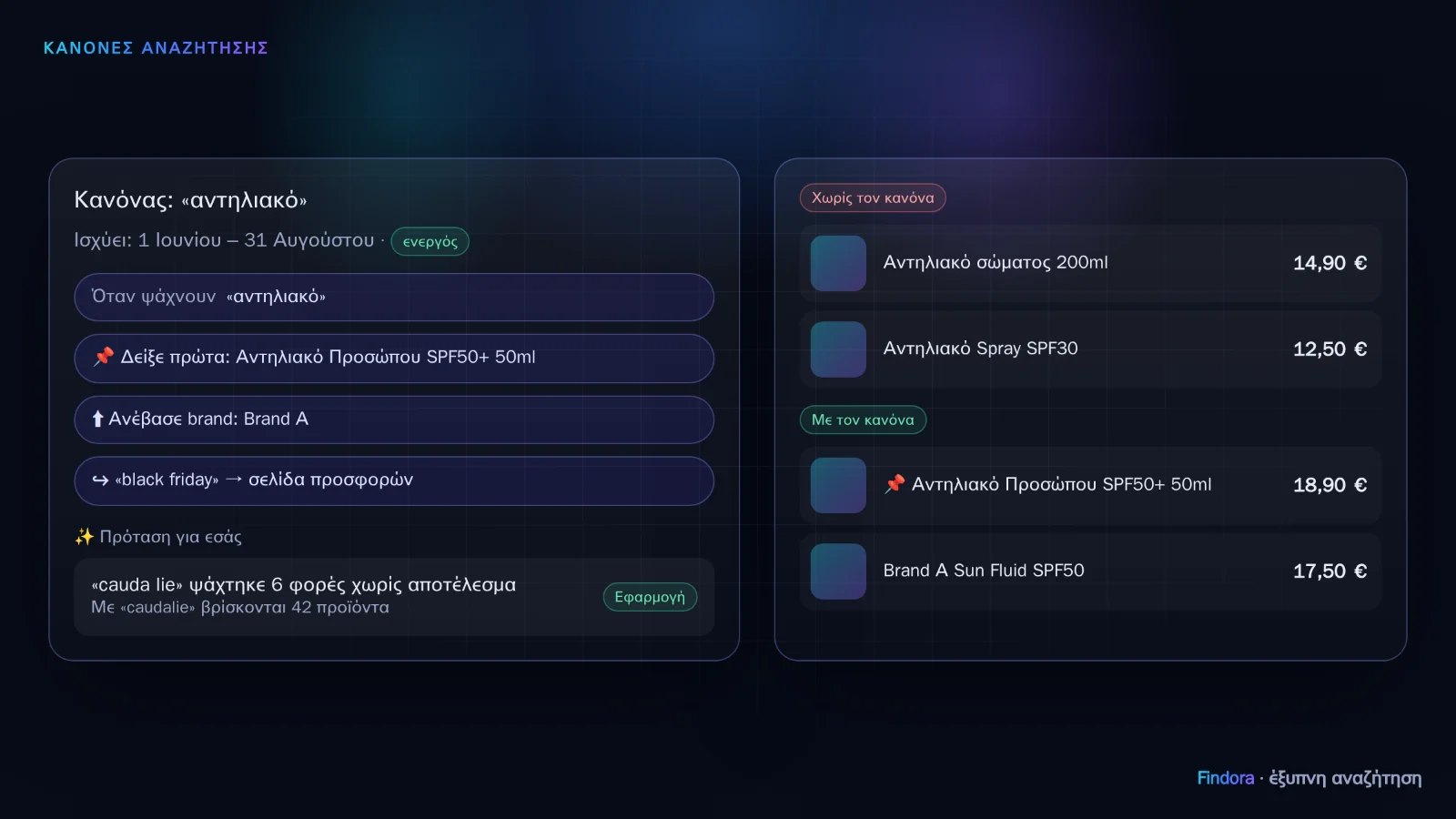 A rule for the search “αντηλιακό” (sunscreen), with a before-and-after preview.
For all plans
- Out-of-stock products: automatic (among equally relevant products, in-stock ones first), at the end, or hidden. With “Available alternative”, the most similar product you have in stock appears under each out-of-stock item.
- When nothing is found: you choose what the customer sees and in what order: an equivalent brand when they ask for something you don’t carry (“We don’t stock Eucerin. See equivalents from La Roche-Posay”), related products, popular products, or the AI assistant. Typo correction always comes first.
- Ranking priority: among equally relevant products, show popular items, offers, best sellers or new arrivals first.
- Categories that are not suggested: e.g. medicines. They don’t appear as suggestions or in the AI assistant, but they are still found as normal when a customer searches for them by name.
Per-search rules (Pro and Enterprise)
For one or more searches you can set:
- Show first specific products, in the order you want.
- Boost or bury brands and categories.
- Hide products you don’t want to appear.
- Search for this instead: your own synonyms, e.g. “μπεμπέ” (bébé) → “βρεφικό” (baby).
- Go to page: e.g. “black friday” → your offers page.
Every rule can have dates (it starts and ends by itself), a before-and-after preview of the results, measurement (searches, clicks and revenue since it went live) and a history with rollback.
Smart rules (Enterprise)
- Suggestions from your data: searches that keep returning no results, with a suggested alternative that is checked to bring back products before it is proposed to you; and popular searches where the product customers click isn’t in the top positions. You click Apply or Dismiss. No substitutes are suggested for medicines.
- Rules in plain language: you write “In June, when people search for sunscreens, show La Roche-Posay first” and the rule is prepared, using your own brands and products, for you to review before it is saved.
All rules take effect within seconds, in the dropdown, on the results page and in the AI assistant.
Want to see how it would work with your own catalogue? Request a demo or get started now.